


Change Governance: Technical Overview
How Change Governance in Liquibase Secure Server centralizes policy management, maps policies to pipelines through Assignments, and inherits the Secure Server security and permission model.

Summary
In Liquibase Secure Server, Change Governance capabilities bring centralized policy management which scales organizational standards across the Enterprise while decreasing the need for manual review. Entirely within the customer’s trust boundary, Change Governance provides a graphical, searchable, shareable, and customizable library of Policies, assigns policy coverage to a customer’s entities (pipelines, connections, changelogs), and inherits the Secure Server permission model, designed for the access control patterns of regulated environments.
For application developers, DBAs, governance leads, and compliance teams, Change Governance provides modern configuration methods, scaled delivery, easily shared compliance workflows, and integrated audit trails for clear accountability.
New Capabilities and New Terms
The Change Governance capability introduces wholly new aspects to the Liquibase ecosystem, and thus also introduces new terms for users, enablers, and docs.
- Workspace - The top-level construct in Liquibase Secure Server holding all users, groups, governance assets, and Change Intelligence assets. (Note: In 6.0 users are currently limited to one workspace.)
- Catalogs - Within a user’s policy collection, catalogs are the top-level bucket, holding packages, which in turn hold checks. Users are free to build and populate catalogs by platform, or user, or release, or whatever works within their organization’s workflows.
- Packages - While not new, packages are not super widely adopted and are getting a refresh in V6. As before, packages hold checks, but starting with v6, all checks are in a package. Initially structured by the checks’ category, an aspect introduced in V5.2 (Note: legacy “uncategorized” checks are in an “Uncategorized Checks” package). The package is the base element in Change Governance.
- Assignments - Assignments are the mapping of policy assets to workspace entities (projects, pipelines, connections, changelogs). Assignments carry an immutable Assignment ID, used in checks operations carried out by the Secure CLI. Assignments have names, descriptions, IDs, and access permissions as their identifying metadata. Assigning one check from a package actually assigns the whole package, with all “unassigned” checks disabled by default. (Governance Assignments should not be confused with a template assignment in the authorization model, which applies a permission template to a group.)
Executive Summary
Liquibase Change Governance is the centralized policy management module of Liquibase Secure Server, providing enterprise teams a single pane for finding, creating, customizing, organizing, and sharing the Policy library. It replaces local and remote file wrangling via command-line wizards with graphical, searchable collections of policy assets (catalogs, packages, and checks) and it maps that library to the entities teams already operate (pipelines, database connections, and changelogs) through named Assignments. Policies are written once and reused across releases, applications, and lines of business. Successful compliance workflows are copied, tweaked, and shared instead of rebuilt.
Assignments are the mechanism that keeps collaborative work viable from dev to production. Each Assignment carries an immutable Assignment ID so Policy content can be edited, extended, or retargeted by permissioned actors without touching pipeline configuration. This means Governance evolves without breaking established CI/CD parameters.
Change Governance runs entirely inside the customer’s trust boundary and inherits the Secure Server permission model: seven persona-based templates applied at workspace, project, or connection scope, group overlays that customize without forking the upstream template, entity-level grants and denies for exceptions, and an immutable system log of every permission change. Governance runs provide key data for Change Intelligence dashboards, closing the loop from policy definition to executed evidence, remediation, and improvement.
This white paper provides the architectural and security detail required to support enterprise architecture, security, and compliance reviews of Change Governance as it ships. Liquibase does not publish a separate Secure Server reference: the chapters on deployment, security posture, access tokens, authorization, the system log, and sizing describe Liquibase Secure Server as a whole, because Change Governance shares that infrastructure with the server’s Core services and with Change Intelligence.
Key Outcomes for Enterprise-scale Governance Teams
- Centralize policy management so standards are written once and applied many times across the organization.
- Scale governance delivery without scaling manual review workloads: teams are a click away from pre-configured, tested policies.
- Share proven compliance workflows across releases, applications, and lines of business by copying and adapting what already works.
- Separate duties cleanly, with different groups governing the same pipelines under their own Assignments and concerns.
- Strengthen audit readiness with permission audit trails and governance run evidence in Change Intelligence.
The Change Governance Problem at Enterprise Scale
Enterprise change governance does not fail for lack of policy. It fails because useful policies live in multiple local and remote files, a friction often dodged by skipping policy check operations. Checks-settings files, package files linking to other checks-settings files, flow files which invoke them, and properties files are scattered across repositories, workstations, and CI/CD agents, configured through command-line wizards by the one person on the team who knows them. A standard proven on one pipeline is copied by hand to the next, or not at all. Coverage is asserted rather than known, and the evidence that a given policy actually governed a given deployment is reconstructed after the fact.
The centralized Change Governance capability of Liquibase Secure Server closes the gap by making policy a centralized, searchable, and shareable organizational asset rather than just another set of files, turning a proven standard into actual organizational infrastructure, all with common-sense access controls. A catalog of packages and checks is authored once, divided by outcome, platform, release, or pipeline, however the organization already works, and easily tuned and tweaked across releases, applications, and lines of business. An org’s base library is copied into a new catalog in a few clicks, then customized for a team’s specific compliance concerns, to be put to work without rebuilding it all by hand.
Existing investment carries forward, growing from teams who already have the policies, checks, and knowledge. What large Orgs lack is a way to hold them in common, see where they apply, and prove they ran. The Change Governance capability of Liquibase Secure Server bridges this gap.
Capabilities Overview
There are two main aspects to Change Governance experience in Secure Server: Policies and Assignments, reflected in the two links under Govern in the left side navigation.
Policies
Managing Catalogs
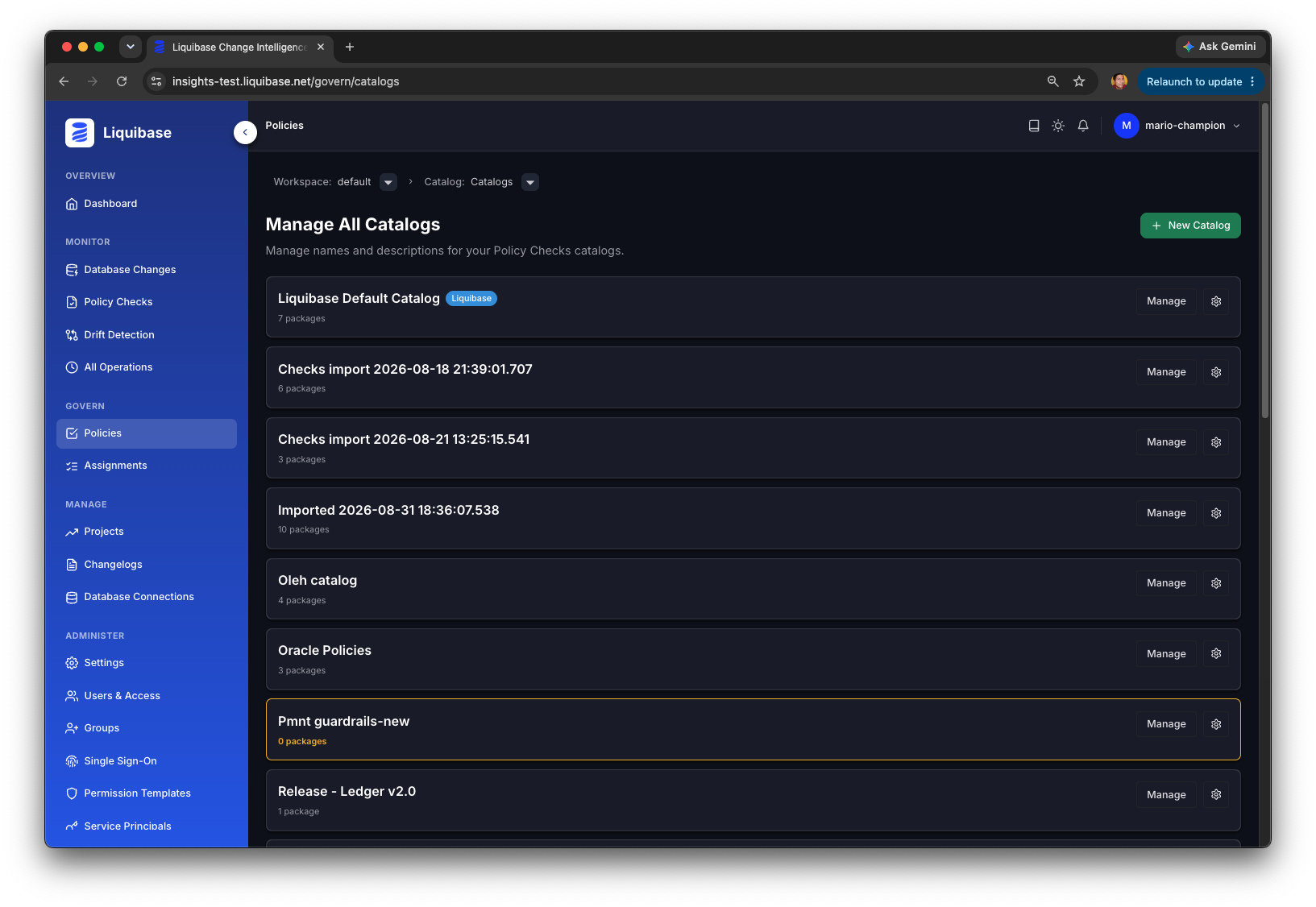
Clicking the Policies link brings up a list of all catalogs in the workspace. Each Catalog card contains the title, description, package count, as well as Author/author email, Created date, and the Groups which have permission to view, use, edit the content in the catalog. From this page you could also create a New catalog, using the green +New Catalog button, or search the Catalogs to find a specific one.
Click the card or manage button to open the catalog to list the packages it contains.
Managing Packages
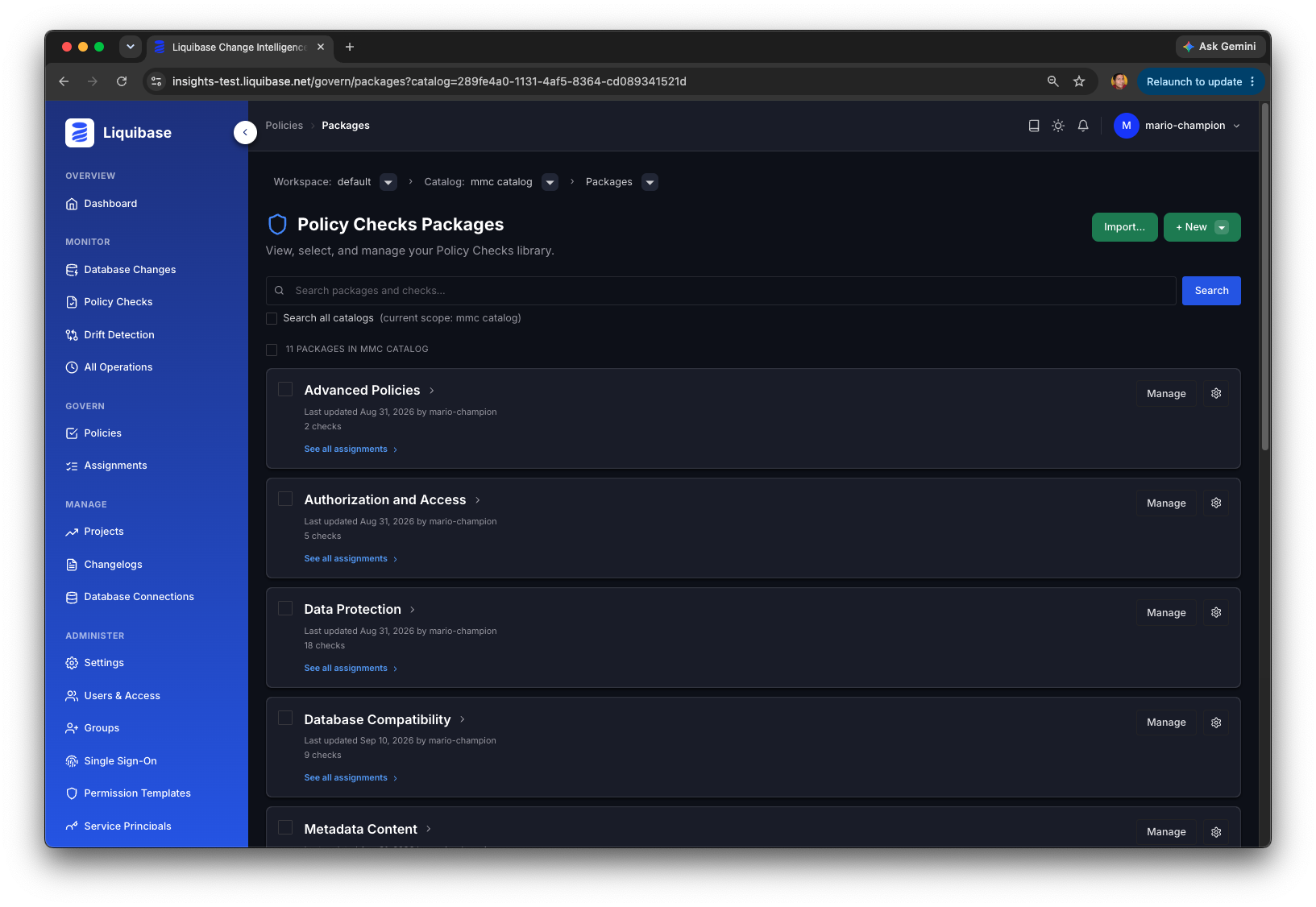
Choosing a catalog from the All Catalogs page or the interactive breadcrumb opens a list of all the Packages in that catalog. Each package card contains the title, description and meta data about the package, as well as options to see all the assignments this package is in, and various other management tools. Click the package (or the Manage button) to open the package to see and configure the checks it contains.
From this screen you can also create a new catalog, package or check using the green +New button. Created packages or checks automatically are contained within the current catalog. Users can also import a checks-settings-file, or a bundled checks package zip created from the Secure CLI’s “checks export” command, to immediately generate a full catalog > packages > checks structure from your existing policy content. Custom Python checks are imported with their configuration and script-path; the Python scripts themselves stay local to the Secure CLI (see Note: Custom Python Checks in Assignments).
Managing Checks
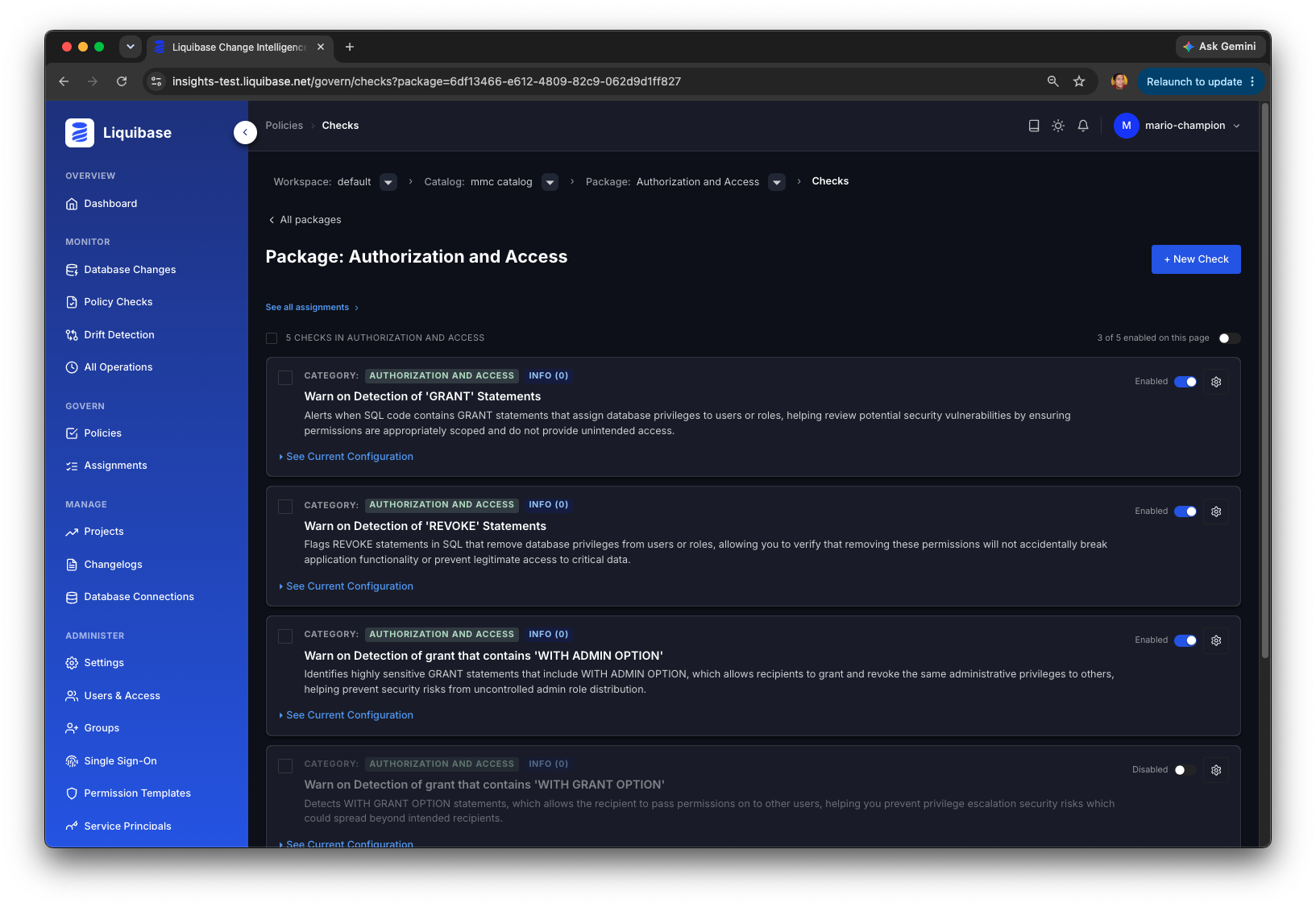
Clicking a package lists all the checks contained in the package. New checks can be added to a package by clicking the upper right green +New check button, or by copying checks from another package. Checks are selected in bulk with the upper left checkbox, or by the individual checkboxes on each check card, which lists the check shortname, description, category, severity setting, and an option to see and edit the check’s parameter configuration. Checks can be enabled/disabled in bulk across the package from the upper right toggle, or individually per check from the check card’s Enabled status toggle.
Configuring Checks
A check’s specific parameters can be configured by choosing “configure” from the gear icon on a check card, or clicking the See Current Configuration link near the bottom of the check card. This will reveal the checks config panel, which is activated by clicking the Edit button. The value options for each parameter are listed when values are enumerated, or as open input fields when the values are open-ended.
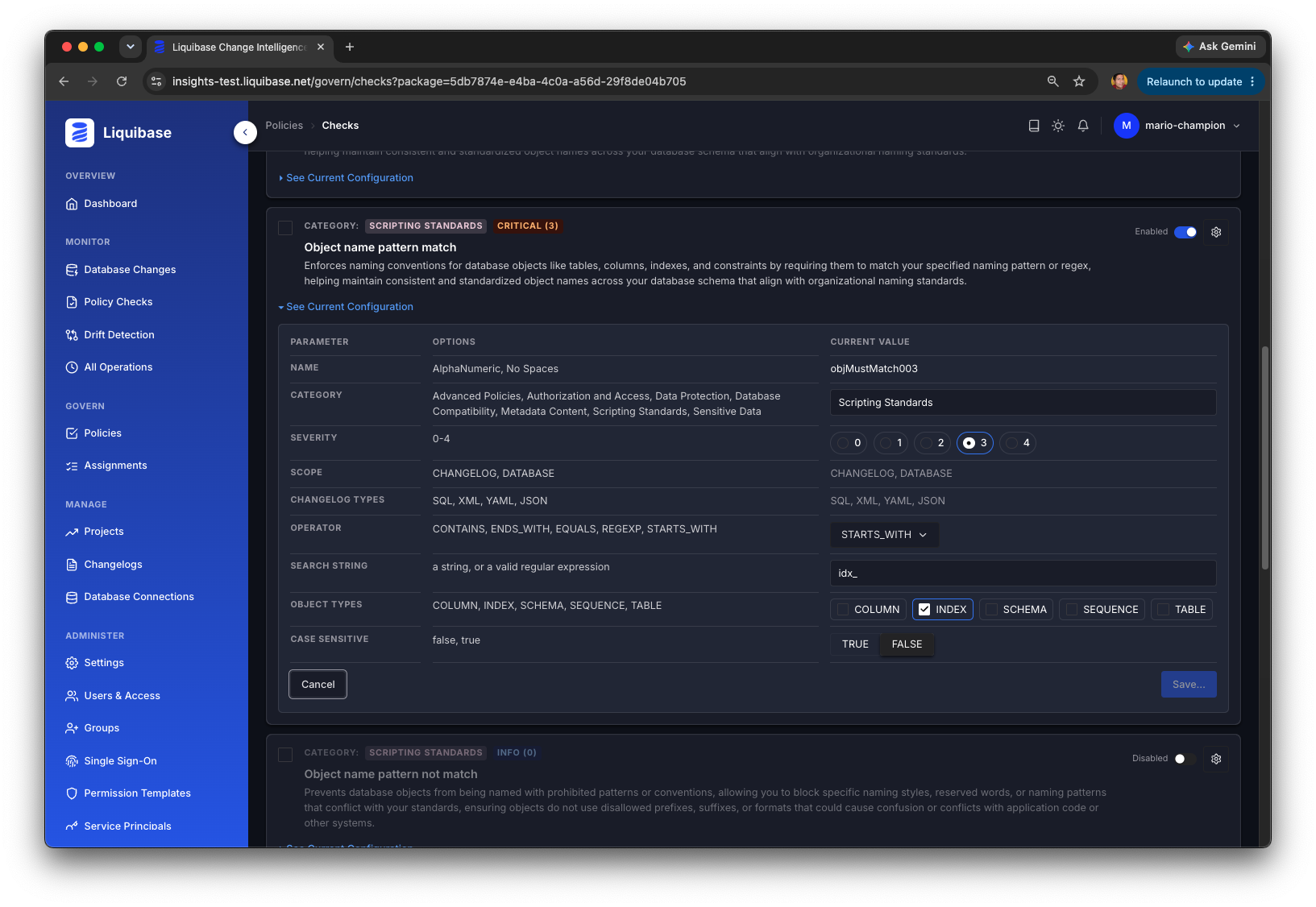
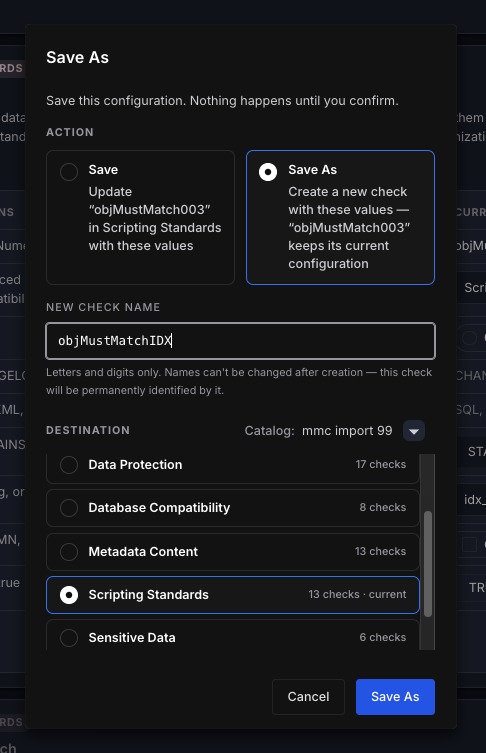
Click the lower right Save button to confirm your changes, at which point you can decide to overwrite existing values with a “Save” confirm, or generate a new check by choosing “Save As...”. The Save As process also allows the user to rename the check, and choose a new destination, including any catalog and package for which they have access permissions.
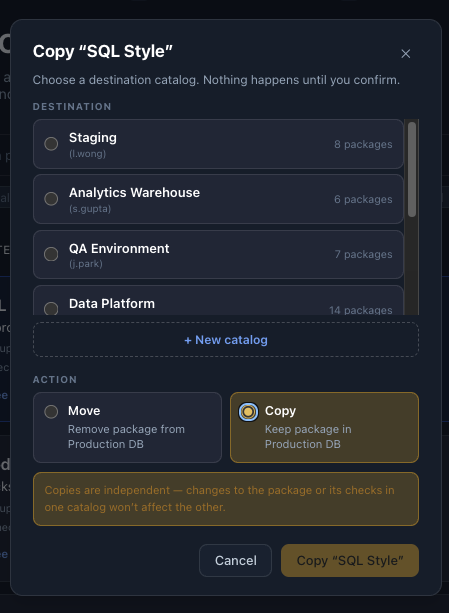
Sharing checks by copying across catalogs and packages
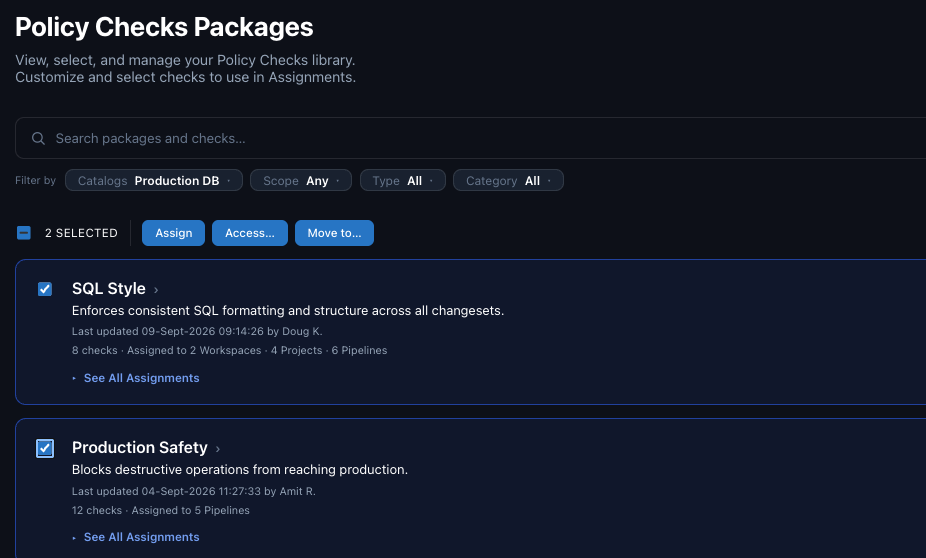
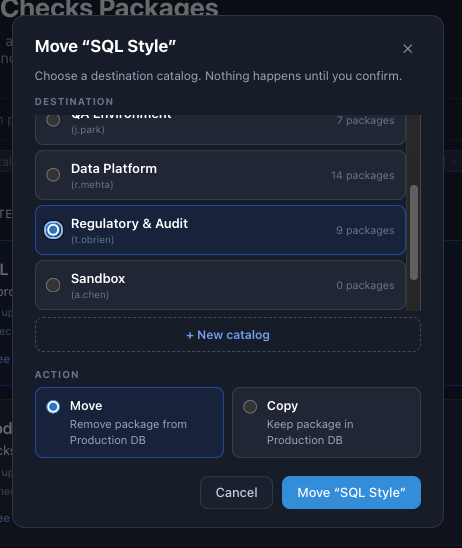
Checks can be shared and tuned by another user (with access permissions) which greatly increases efficiency of developing policy coverage across an Enterprise. Full packages can be selected by clicking their checkbox or just individual checks to surface three options: Assign, Access, Move. The Move button opens a dialog to choose a destination catalog and package. Once a check is copied, all changes to it are specific to that copy and the original is unaffected.
(Note: the Assign button sends these checks to the Assignments element of Change Governance, described below, and the Access button opens the screen to configure access permissions to the selected packages)
Assignments
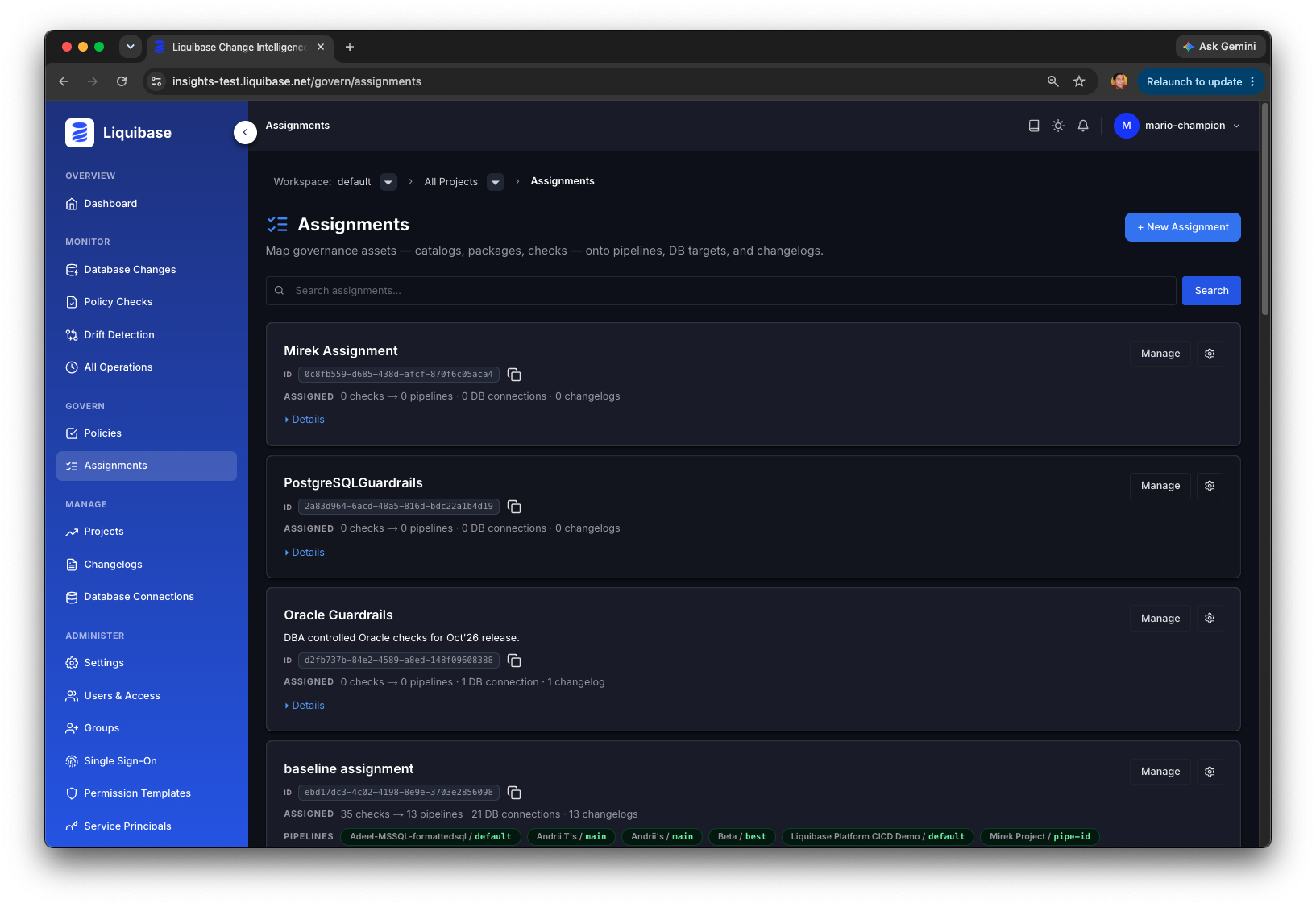
Assignments are the mapping of policies to workspace, project, and pipeline assets (like changelogs and connections), which generate an Assignment ID used in Liquibase checks workflows. The initial Assignments page lists assignment cards, which contain titles, descriptions, Assignment ID, pipeline and group permissions, and behind a Details link, meta information such as Author, creation date, and the like. Click the card or manage button to reveal the specific policies and workspace assets in the assignment.
Note: Custom Python Checks in Assignments
A custom Python check has two parts that live in different places. The check’s configuration and parameters, including the script-path parameter, are managed and configured in Change Governance; importing a checks-settings file brings them in along with the rest of the check content. The Python script itself is not uploaded to Liquibase Secure Server and remains local to the Liquibase Secure CLI. When the Secure CLI runs a checks operation with an Assignment ID, it receives the check configuration from Secure Server and runs the script found at the script-path on the executing host. Custom Python checks therefore work in Assignments as long as the referenced script is accessible at that path from every Secure CLI host that runs checks for the Assignment.
Users can also create Assignments using the upper right + New Assignment button.
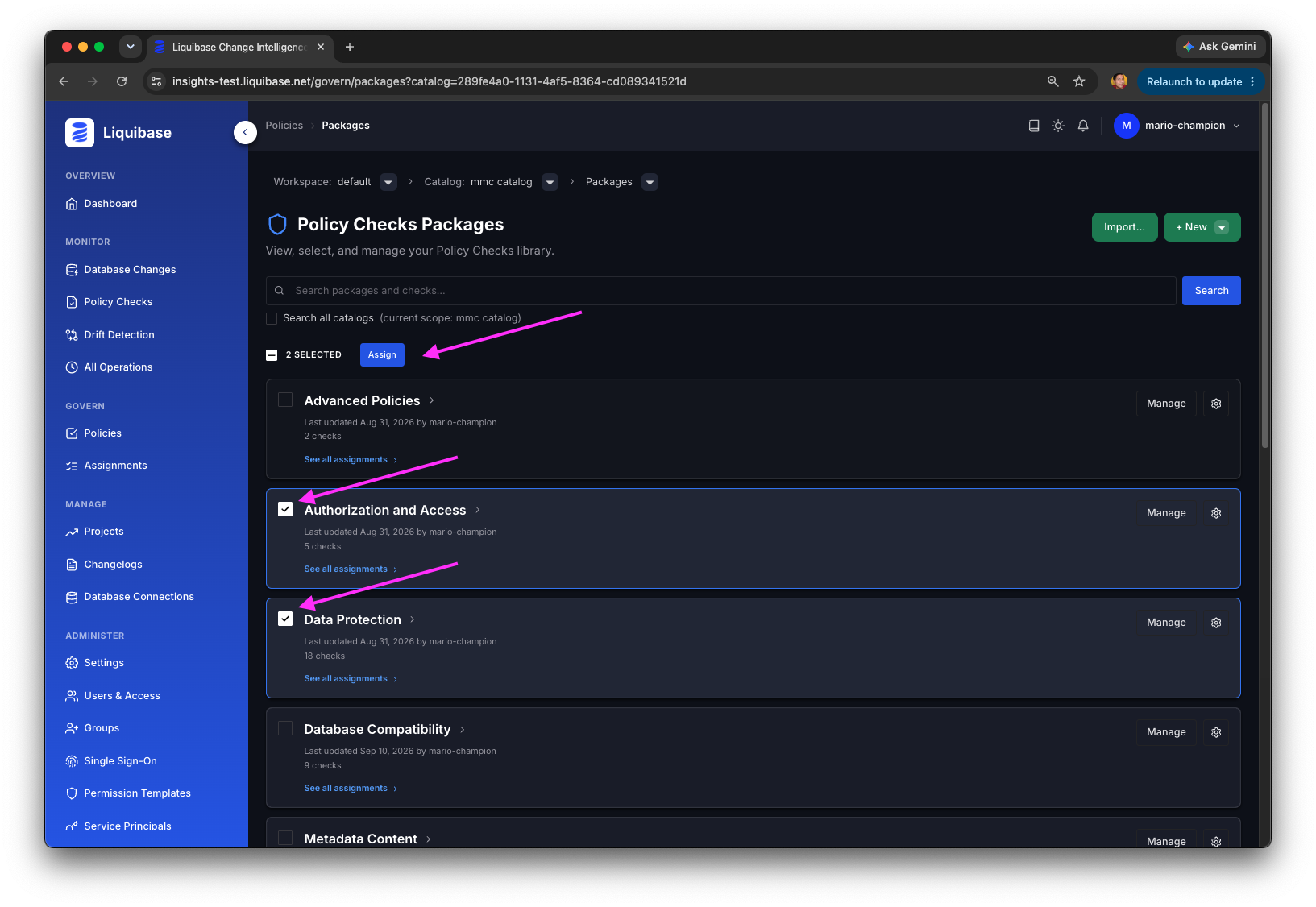
To create an assignment, choose Policies (either specific checks or full packages) and click the Assign Button.
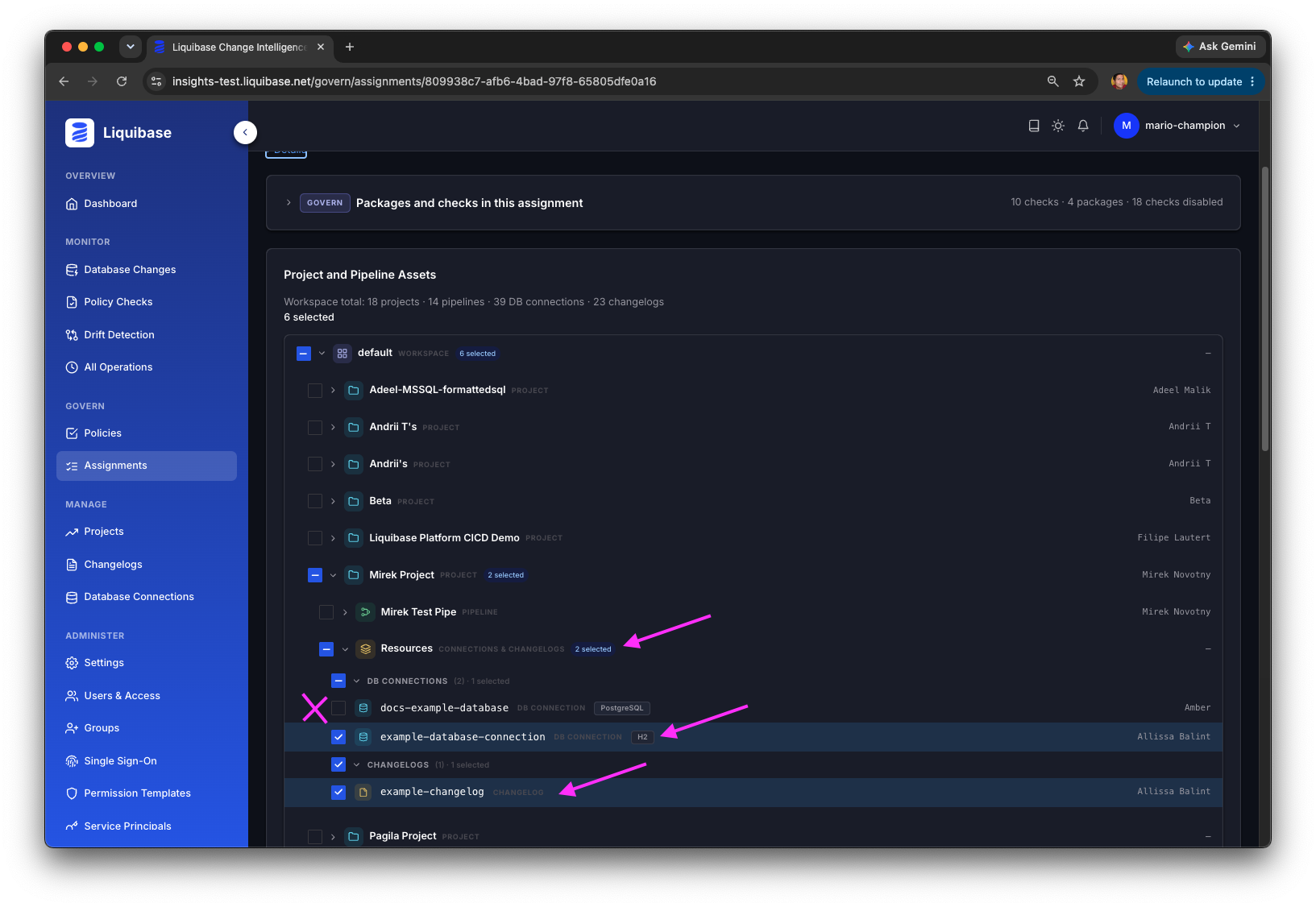
After clicking Assign, either create a new assignment or choose an existing one from the list. The opened assignment will list all the workspace and project assets. You may select the ones for which you have Access permissions, and can see the one for which you do not have permission, but may not select them.
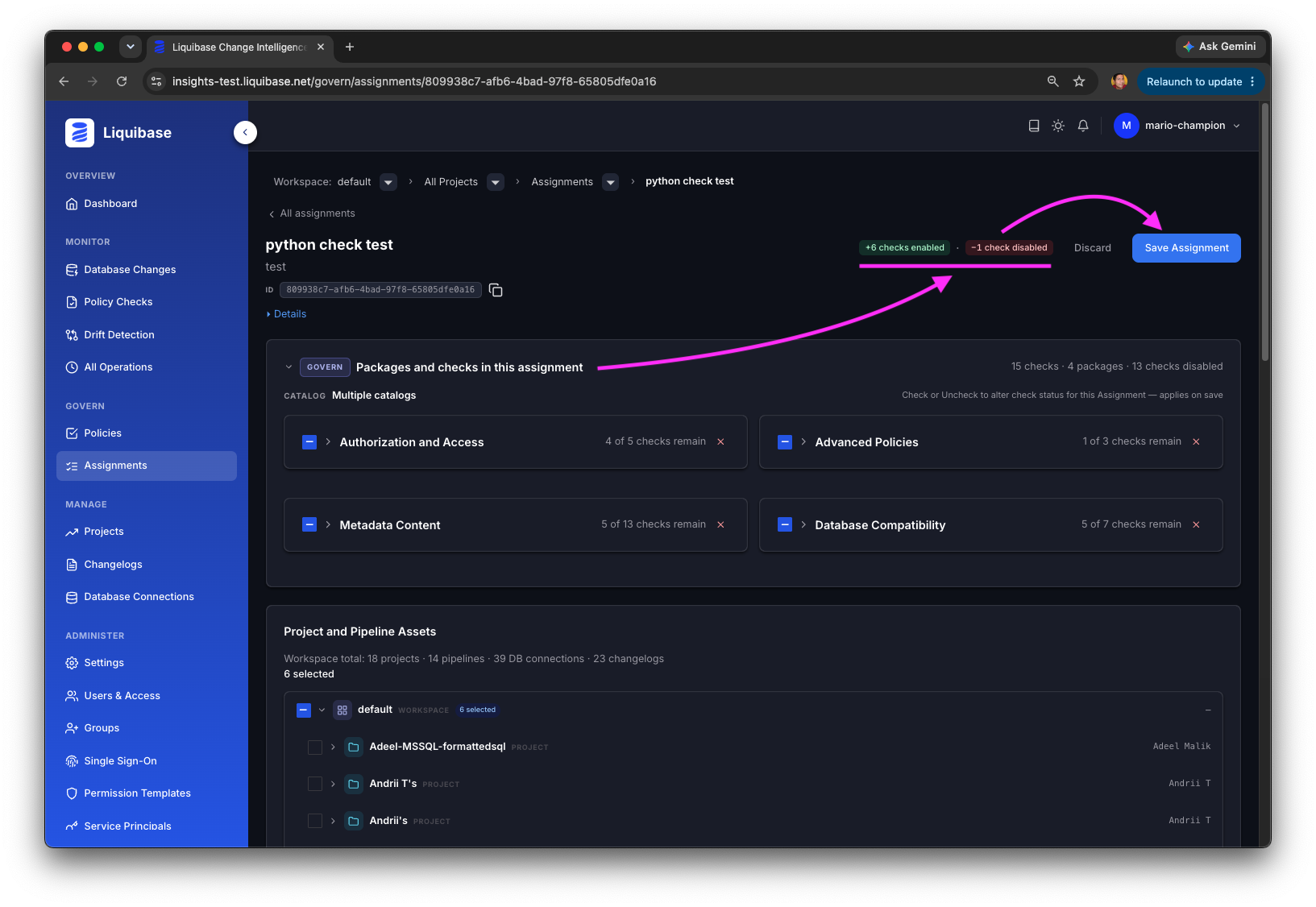
After choosing the collection of workspace and project assets click the Save button to generate or update an Assignment.
An Assignment ID is immutable, so it remains the same even as policies or covered assets change within it, which means Pipeline and checks operations do not need to make any changes to use updated policy or asset changes to an assignment.
Designed for Enterprise Personas
Application and Team leads, DBAs, Policy Authors, Governance and Compliance, Platform engineers, Security reviewers, and Auditors all have a default permission template tuned to their workflow. Permissions are governed centrally by Liquibase Secure Server, audited continuously, and extensible via overlays and entity-level grants and denies without forking the model.
What Change Governance Is, and Is Not
Change Governance is the centralized policy management module of Liquibase Secure Server. It holds an organization’s policy assets, organized as catalogs, packages, and checks, in a searchable, shareable library, structured however an Enterprise works: sorted into packages by shared concern such as production safety or naming conventions, or one catalog per database platform, etc. Users map those governance assets to the platform entities, pipelines, database connections, and changelogs, through a graphical interface, and express coverage as named Assignments. Each Assignment issues an immutable Assignment ID that CI/CD workflows reference in place of a checks-settings file. Every check and package carries an assignments view, so teams can see where an asset is in use before changing it.
Change Governance is not itself a policy engine and not a database client. Checks execute where they always have: in the Liquibase Secure CLI, running inside the customer’s existing pipelines and developer workflows, using the Assignment ID. Change Governance stores and resolves the policy configuration that a run consumes, and receives the results of that run for reporting in Change Intelligence. Change Governance also is not a version control system for changelogs or schema; it manages policy assets, checks, packages, and their configurations, not the database changes those policies inspect. Finally, Change Governance does not connect to a customer’s databases, does not execute checks itself, and, beneficially, it does not require users to author or maintain the Liquibase ecosystem files that policy has historically lived in.
Change Governance is also not a standalone application. It has no API, web tier, database, or authentication of its own; it is a licensed module that runs inside Liquibase Secure Server alongside the server’s Core services and Change Intelligence, and it is administered through the same workspace, groups, templates, and system log.
This separation is intentional and has important practical implications:
- The Liquibase Secure CLI remains the execution point. Existing CI/CD jobs keep their structure; the only change is that the checks run and checks show commands reference an Assignment ID rather than a checks-settings file path.
- Policy changes do not require pipeline changes. The Assignment ID is immutable, so checks and targets inside an Assignment can be added, removed, or tuned and tweaked without editing established workflow parameters.
- One asset can be governed from several perspectives. A single pipeline or connection can carry multiple Assignments, letting a DBA guild, a platform admin group, and a security review group each enforce their own concerns and keep each run narrow to what that group inspects.
- Ecosystem files become background infrastructure. Checks-settings files, package files, flow files, and properties files are managed by Secure Server. New users and server-only users do not need to know they exist to find, customize, share, and deploy policy.
- Existing policy investment carries forward. A checks-settings file or checks package file can be imported directly into a new catalog or package, so an organization’s established standards populate the library rather than being rebuilt.
- Governance activity is reportable, not reconstructed. Check run output returns to Change Intelligence, where policy outcomes appear alongside deployment and drift evidence.
Liquibase Secure Platform Architecture
Liquibase Secure is delivered as two components. Both run inside the customer’s trust boundary, and Change Governance is a module of the second.
Liquibase Secure CLI. The command line tool that installs on developer workstations and CI/CD agents and implements Change Automation: it reads changelogs, previews SQL, runs policy checks, applies and rolls back change, detects drift, and writes reports and structured logs. It makes outbound connections only and holds no credentials beyond the moment of execution. The Secure CLI also hosts the Change Intelligence extension, which is bundled in the distribution and disabled by default, and its checks commands can resolve policy configuration from Change Governance instead of a local file. The Secure CLI is described in the companion Change Automation Technical Overview.
Liquibase Secure Server. A self-hosted, containerized server that the customer deploys and operates. It never connects to a managed database; everything it knows arrives from Secure CLI instances running in the customer’s own pipelines or from users in the browser. Secure Server hosts three functional areas behind one API and one web application:
- Core services, present in every installation: account and workspace services; project management and the shared entity model (projects, database connections, changelogs, and pipelines); license management and tracking; role-based access control (the permission catalog, templates, groups, overlays, grants and denies, and the resolver); and the other administration services (users, service principals, access tokens (service tokens and personal access tokens), single sign-on configuration, and the system log).
- Change Intelligence, the licensed visibility module: it receives operation metadata from the extension, files it under the shared entity model as operations, and presents deployment history, DORA metrics, policy check outcomes, drift findings, and on-demand AI analysis.
- Change Governance, the licensed policy module: it holds the organization’s policy library as catalogs, packages, and checks, and maps that library to projects, pipelines, connections, and changelogs through Assignments that the Secure CLI resolves at runtime of checks operations.
The modules are not separate applications. They share the Secure Server API and web tiers, the data stores, the authentication layer, and the access control model. Each module registers its own permission domain with the Core RBAC catalog and contributes grants to the seven default templates, so administering access to Change Governance uses the same groups, templates, and system log as everything else in the server. Licensing is enforced at the same point: a module the installation is not licensed for has its permissions made inert and its interfaces closed, while the Core services remain fully administrable.
Within this architecture, Change Governance occupies one place, the module in Secure Server, and has one counterpart in the Secure CLI: the checks commands, which resolve an Assignment ID against the server and then execute the checks on the host. Everything around them, from authentication and RBAC to the data stores and the reverse proxy, is Core infrastructure that Change Intelligence uses in exactly the same way. The rest of this document describes the Change Governance-specific parts first, then the shared server infrastructure as it applies to both modules.
Solution Architecture
Change Governance consists of two parts inside Liquibase Secure Server, the module’s routes in the Secure Server API and its two user interfaces in the Secure Server web application, and one counterpart in the Secure CLI, the checks commands that resolve an Assignment ID against the server. All of them run inside the customer’s trust boundary, and the server side is reached through the same reverse proxy, on the same port, as everything else in Secure Server.
Change Governance Module in the Secure Server API
The Secure Server API is a NestJS service written in TypeScript. The Change Governance module contributes the catalog, package, check, and Assignment routes to that API, together with the Assignment resolution endpoint the Secure CLI calls. It validates and persists policy assets and Assignments in the customer-controlled primary database, relies on the Core services for tenancy and authorization, serves the REST endpoints consumed by the Policy and Assignment interfaces, and emits real time events over WebSockets via Redis pub/sub. The API tier holds no state of its own; in the supported deployment it runs as a single container behind the reverse proxy.
Change Governance Surfaces in the Secure Server Web Application
The Secure Server web application is a Next.js application written in React, served by its own Node process behind a reverse proxy: either a customer-provided reverse proxy or an nginx container managed by the Secure Server Docker Compose configuration. Change Governance contributes two connected interfaces to that application: one for configuring Policies (catalogs, packages, and checks) and another for configuring Assignments. The system log and permission management interfaces belong to the Core services and are shared with Change Intelligence. The web application communicates with the API over HTTPS for REST traffic and over WSS for real time updates.
Assignment Resolution by the Secure CLI
When configured with a valid Assignment ID, the Secure Server URL, and an access token during a checks show or checks run operation, the Liquibase Secure CLI requests the configuration behind that Assignment from Secure Server. The server responds with the resolved checks and their settings, which the Secure CLI consumes exactly as it would a local checks-settings file, running the operation as usual on the executing host and, if so configured, reporting the operational outcome to the Change Intelligence module through the extension. For custom Python checks, the resolved settings include the script-path, and the Secure CLI runs the referenced Python script from the executing host. Assignment resolution is a capability of the Secure CLI’s built-in checks commands, not of the Change Intelligence extension; the two paths share only the token that authenticates them.
Data Flow: Creating Policies, Generating Assignments, Deploying via Liquibase Secure CLI
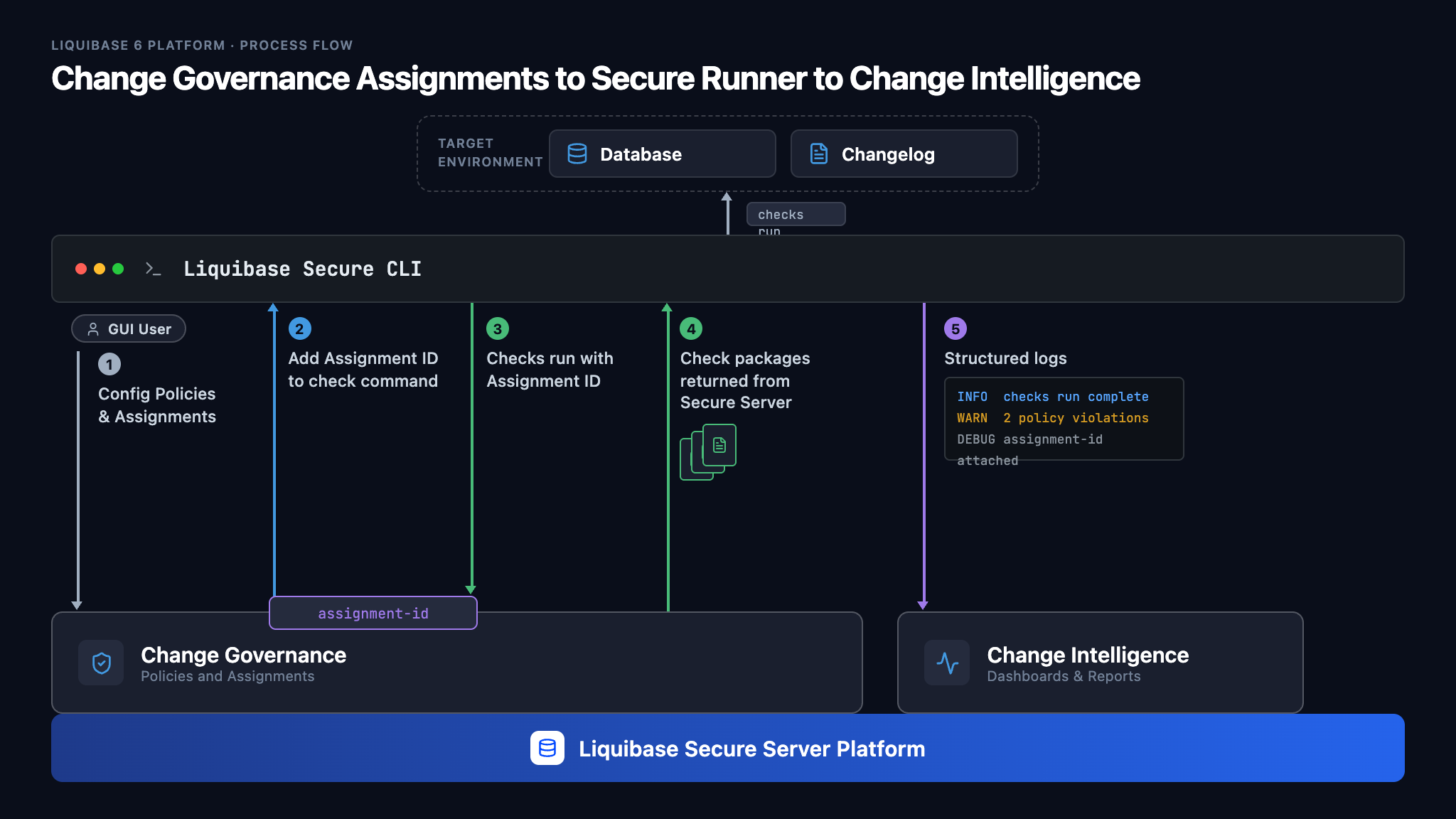
The data flow from Change Governance to a Liquibase Secure CLI operation, and back to Change Intelligence:
- A user finds, creates, and customizes Governance assets (policy packages or checks) for their specific needs in the Secure Server web application.
- The user selects Governance assets to be assigned to projects, pipelines, connections, or changelogs.
- An Assignment ID is generated and carried as a property, environment variable, or other standard method to the Liquibase Secure CLI’s checks operation within the CI/CD or sandbox workflow.
- The Liquibase Secure CLI’s checks operation requests the Assignment from Liquibase Secure Server, presenting the Assignment ID and a valid access token.
- Liquibase Secure Server responds with the configured check settings.
- The Liquibase Secure CLI executes the checks operation on the host, including any custom Python scripts referenced by the Assignment’s checks, which must be available on that host.
- If so configured, the Change Intelligence extension in the Liquibase Secure CLI sends the structured results to the Change Intelligence module, where they appear on the dashboards.
Logical Architecture
The diagram below summarizes the two components of Liquibase Secure, the trust boundary, and the small set of external dependencies. Change Governance is highlighted.
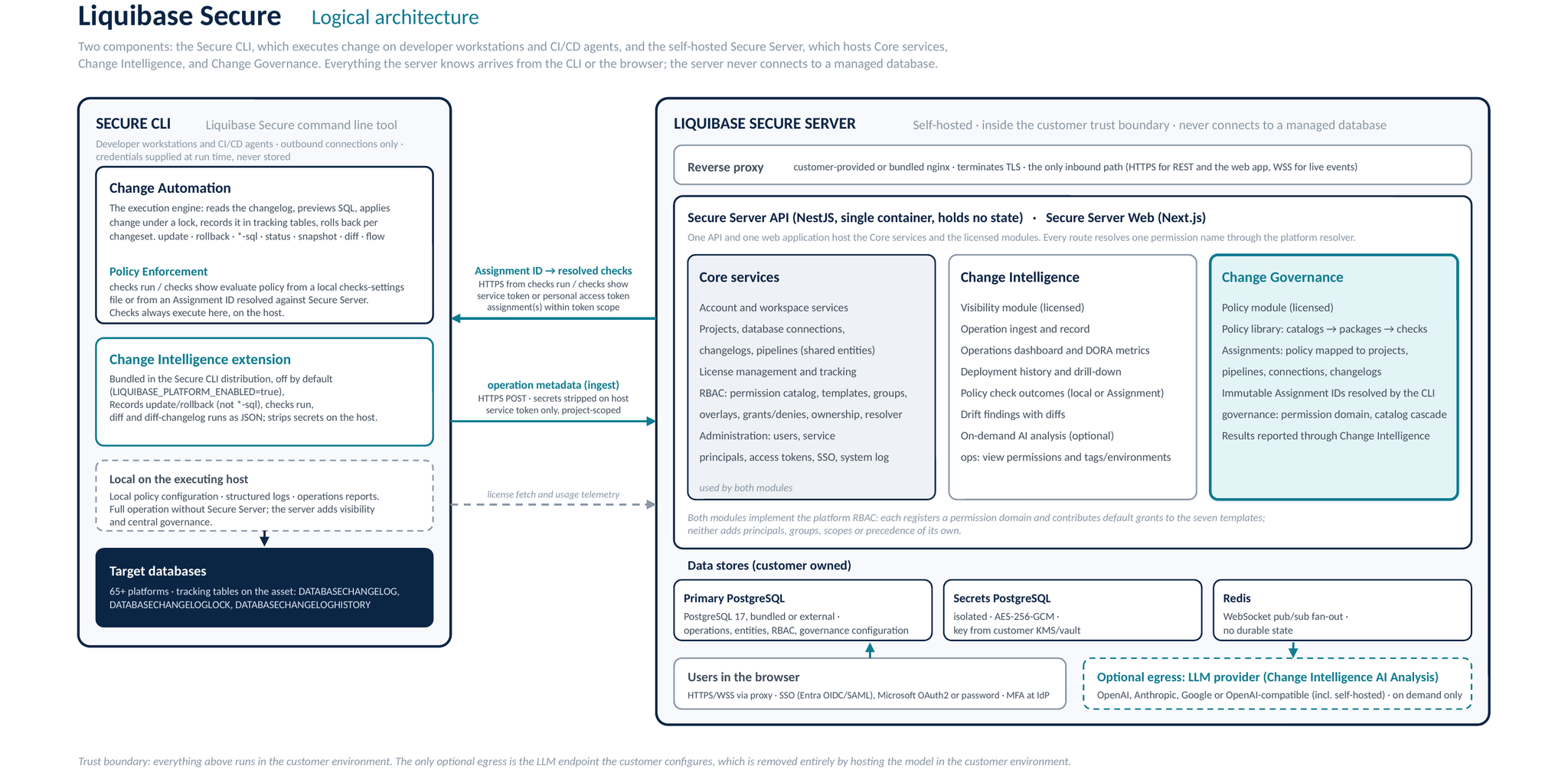
Three paths cross the boundary between the Secure CLI and Secure Server, and all three are initiated by the CLI over HTTPS: the Change Intelligence extension posts operation metadata to the ingest endpoint; the checks commands request the check configuration behind an Assignment ID from Change Governance; and the license endpoints serve the CLI its license and receive usage information. Users reach the web application through the reverse proxy over HTTPS and WSS. The only optional egress from the server is the LLM endpoint the customer configures for Change Intelligence AI Analysis, and it is removed entirely by hosting the model in the customer environment.
Deployment Model
Change Governance runs inside Liquibase Secure Server, which is delivered as a self hosted product. The customer owns the deployment, the data, the network, and the egress posture. Liquibase publishes container images and a Docker Compose configuration that runs on any host the customer operates, on premises or on a cloud VM. There is no separate installation for Change Governance: the module is part of the Secure Server images and is activated by the license.
Components Inside the Trust Boundary
All runtime components run within the customer environment. None require Liquibase managed infrastructure or external SaaS dependencies for normal operation. The components below are shared by Core services, Change Intelligence, and Change Governance.
Network Posture
- Inbound: limited to the reverse proxy that fronts the API and Web tiers. The proxy terminates TLS for HTTPS (REST and the web application) and WSS (live events). Two kinds of clients arrive through it: users in the browser, and Secure CLI instances on the customer’s CI/CD agents and developer hosts, which post operation metadata for Change Intelligence and request Assignment configuration from Change Governance. No other inbound paths exist.
- Outbound: required only when Change Intelligence AI Analysis is enabled, and only to the LLM endpoint the customer configures. Change Governance itself makes no outbound connections: the Assignment resolution exchange is a request from the customer’s own Secure CLI and a response from the server, both inside the customer environment. Customers who do not enable AI Analysis, or who point it at a self-hosted model, can operate Secure Server in a fully air gapped configuration. Installation and updates can also run offline: images can be copied into the customer’s own registry, and a verified release bundle can be installed without internet access.
- Lateral: no connectivity is required or used from Secure Server to monitored databases. Change Governance in particular never reaches a database or a changelog: checks execute in the Secure CLI, on the host that already has access to the target.
Data Residency
All customer data, including operation records, properties, policy assets, Assignments, and configuration, remains in customer owned databases. Nothing leaves the customer environment except traffic between the customer’s own Secure CLI instances and Secure Server, and, optionally, a customer configured AI provider call made by Change Intelligence.
Security Posture
The security posture described in this chapter belongs to Liquibase Secure Server and applies identically to Core services, Change Intelligence, and Change Governance. Where Change Governance adds a control of its own, the text says so.
Transport Security
TLS is terminated at the customer’s reverse proxy in front of the API and Web tiers. Cipher suites and certificate management follow customer policy at the proxy layer. HTTPS is the recommended configuration for every deployment reachable over a network the customer does not fully control, and is what the documentation directs operators to. Secure Server also accepts plain HTTP for local and fully isolated environments where encryption is not a requirement, so transport encryption is a deployment decision rather than a product constraint. WebSocket connections from the browser follow the same proxy, as WSS wherever TLS is terminated. Secure CLI traffic to the server follows the same rule: HTTPS wherever the proxy terminates TLS.
Authentication
Authentication is a Core service, built on BetterAuth, and supports the controls expected in enterprise environments.
- Email and password authentication.
- Single sign on against Microsoft Entra, over OIDC or SAML 2.0, configured per workspace.
- OAuth2 with Microsoft as identity provider.
Multi-factor authentication is delegated to the customer’s identity provider. Secure Server carries no native second factor of its own: where the Entra tenant requires MFA or conditional access, those policies are enforced upstream and apply to every SSO sign-in. This is a deliberate design decision, taken so that the server has no separate authenticator enrollment to manage, no recovery-code custody, and no cryptographic surface of its own to bring into FIPS scope.
Operators can close self-service email and password registration for the whole installation. With registration closed, the sign-up route is refused at the server rather than merely hidden, existing accounts continue to sign in, and new users arrive only through SSO or an administrator’s invitation.
Access tokens authenticate Secure CLI and scripted traffic. A service token belongs to a service principal and is the only credential accepted for operation ingest and artifact upload. A personal access token belongs to a user, carries that user’s permissions, and is accepted on every route the user can reach except ingest, artifact upload, console sign-in, and token or account management. Every personal access token expires: users choose 30, 60, or 90 days within a ceiling the administrator sets, and each user may hold at most ten active tokens. Administrators can switch personal access tokens off for a workspace, which suspends rather than revokes them, and deactivating a user revokes their tokens. All tokens are displayed once at creation, are stored only as a hash so they cannot be retrieved later, and can be revoked at any time; service tokens can also be rotated. A request made with the wrong kind of credential, or with an expired, revoked, or suspended token, is refused with a distinct error code.
Single Sign On
Single sign on is configured per workspace by a Workspace Admin, in the application, with no operator-level environment changes. The administrator chooses the protocol that matches their Entra enterprise app:
- OIDC, configured with tenant ID, client ID, and client secret.
- SAML 2.0, configured by uploading IdP metadata, pointing at a metadata URL, or entering the IdP entity ID, sign-on URL, and signing certificate directly. Secure Server publishes its own service provider metadata for registration in Entra.
One protocol is active per workspace at a time. Client secrets and signing certificates are held in the encrypted secrets store described below.
Sign-in is restricted to the configured tenant. Under OIDC, the tid claim on the ID token is validated against the configured tenant. Under SAML, an assertion is accepted only when the issuer matches the configured IdP entity ID and the signature validates against the configured certificate. Personal Microsoft accounts cannot sign in to a workspace bound to an organizational tenant, and a mismatch is refused with a message that names the cause without exposing configuration detail.
First-time arrivals are provisioned just in time and placed in the system Pending group with zero permissions, where they see an explicit awaiting-access screen until an administrator assigns them. Subsequent sign-ins resolve to the same user record through a stable identifier, without creating duplicates and without changing group membership.
Two lockout guards protect the installation from configuration mistakes: the last enabled SSO provider cannot be disabled while self-service registration is closed, and the last remaining administrator cannot be removed. Disabling or deleting an SSO provider revokes the active sessions that provider issued rather than leaving them to expire.
Scope for this release: user provisioning is just in time only, with SCIM deferred; logout is local to Secure Server, with federated single logout deferred; and Entra group claims are not consumed, so group membership is assigned in Secure Server rather than inherited from the directory.
Secrets Handling
Sensitive configuration values, including database connection credentials and SSO client secrets and signing certificates, are held in a separate, isolated PostgreSQL instance. All values are encrypted at rest with AES-256-GCM using per-value key derivation. The master encryption key, the database passwords, and the authentication secret are supplied to the containers as file-based secrets rather than environment variables, so they do not appear in container metadata such as docker inspect, and the web container receives none of them. Customers typically source the master key from their KMS or vault, and it is never stored alongside the ciphertext. Secrets stored on a connection are write-only through the product: no API response and no permission returns a decrypted value.
Sensitive Liquibase properties never reach the server as values. The Change Intelligence extension strips them on the originating host before any network call: it strips any argument that Liquibase itself marks as obfuscated, together with connection URLs, and transmits them as a name with a null value and a sensitive flag, so the secret is never materialized on the sending host. The API applies a second, independent pass on ingest, redacting by key name against the patterns password, secret, token, key, and credential, and stripping credentials embedded inside URL values. The second pass writes a distinct sentinel, so an operator can tell a value the API caught from one the extension stripped as intended. Neither pass is customer-configurable, and both err toward redacting too much. The UI displays a redacted indicator with no reveal control available under any user action.
Change Governance adds no secret handling of its own. Policy assets (catalogs, packages, checks, and Assignments) are configuration, not credentials; the Assignment response returned to the Secure CLI carries the resolved checks and their settings and nothing else. Check results reported back to Change Intelligence pass through the extension’s redaction described above.
Secure CLI Authentication and Principal Separation
Secure CLI instances authenticate to Secure Server with access tokens. Two kinds exist, service tokens and personal access tokens, and the difference matters for least privilege.
Service tokens belong to service principals, a distinct principal type from human users. Service principals are scoped to one or more projects, cannot sign in to the web application, cannot join groups, and can reach only the routes that explicitly admit them; every other endpoint refuses a service token regardless of possession. Four kinds of route admit them: Change Intelligence operation ingest and artifact upload, where a service principal may write operation data only for entities inside its assigned projects; license fetch; and the Change Governance Assignment resolution endpoint, where a pipeline can retrieve an Assignment when at least one of the Assignment’s targets is in one of the service principal’s projects, without any governance authoring rights. A request naming an entity or Assignment outside the principal’s scope and a request naming one that does not exist are refused identically, so a CI token cannot be used to enumerate what exists. This separation eliminates the most common abuse path for pipeline credentials, which is repurposing them for read access. Service tokens can be rotated in place and revoked, and both actions are recorded in the system log. Revoking a service token leaves its service principal and project scope in place; deleting the principal is a separate, confirmed action that revokes its tokens.
Personal access tokens are workspace-scoped, owned by a human user, always expire, and carry that user’s permissions. They are accepted for Change Governance Assignment resolution, for license fetch, and for interactive and scripted use of the API, but never for ingest: operation data is written only by service principals, so a personal access token cannot be used to feed a pipeline’s results into Change Intelligence. Customers should issue a service principal for every CI/CD pipeline and reserve personal access tokens for local and scripted work.
Assignment Resolution Authentication
A single Assignment resolution endpoint accepts requests from the Secure CLI’s checks commands. Each request is authenticated by an access token and names one or more Assignment IDs, and the server validates three things before responding: the token is valid and not expired, revoked, or suspended; the principal behind it is entitled to use the Assignment; and the named Assignment lies within that principal’s scope. A user presenting a personal access token needs the view permission on the Assignment (governance:view:assignment), and the scope is whatever the user’s group memberships, ownership, and direct grants allow. A service principal can retrieve an Assignment when at least one of the Assignment’s targets is in one of its projects. A request that fails any of the three is refused, and a request naming an Assignment outside the principal’s scope is refused identically to one naming an Assignment that does not exist.
The response carries the resolved checks and their settings and nothing else. It grants no read access to catalogs, packages, operations, or any other Secure Server record, and a service token used for resolution cannot be turned around to browse the policy library or the dashboards.
Both service tokens and personal access tokens are accepted for Assignment resolution; ingest, by contrast, accepts service tokens only. Tokens are displayed once at creation, are stored only as a hash, and can be revoked at any time by the customer’s own administrators; service tokens can also be rotated. These actions are recorded in the system log. Because a service token also authenticates Change Intelligence ingest, a pipeline needs a single Secure Server credential to both resolve its policy and report its results.
Supply Chain
Secure Server images are scanned on every release. Each image is accompanied by a VEX (Vulnerability Exploitability eXchange) document recording Liquibase’s exploitability assessment of findings that have no upstream fix, so scanners such as Trivy and Grype can distinguish assessed, non-exploitable findings from actionable ones. Support bundles produced by the installer redact keys, URL passwords, and invitation and password-reset tokens.
System Log
The system log is a Core service. It records events from administering Secure Server, not activity on customer databases; that evidence is the operation record. It captures every permission changing action in Secure Server, across Core services and both modules, in an immutable record. Each entry records the actor, the timestamp, the target, and the before and after state. Logged events include:
- User invitation, deactivation, and reactivation.
- Group create, rename, and delete operations.
- Group membership changes.
- Template assignment, scope change, and unassignment.
- Overlay changes.
- Direct grant create and revoke.
- Direct deny create and revoke.
- Entity ownership added, removed, and transferred.
- Access token lifecycle events for service tokens and personal access tokens: create, rotate, revoke (with reason), expire, suspend and restore (with counts).
- Service principal lifecycle events: create, rotate, revoke.
- SSO configuration changes, including enabling and disabling SSO, protocol changes, tenant and endpoint changes, and secret or certificate rotation. Secret rotations record a reference such as a certificate fingerprint, never the value itself.
- License management: license file import, rejection, removal, and re-verification; changes to effective license status and licensed capabilities, recorded under the System actor when a term or grace period ends on its own; downloads and exports of license data.
The log is searchable by actor, target, and date range, and can be filtered by credential type and to license events. It is retained indefinitely in this release; data offloading assistance and retention policy guidance are planned for a future release. Access is gated by the audit view privilege, which is bundled into the Security Reviewer, Governance Lead, and Workspace Admin templates by default. Entries are exportable for handoff to a reviewer or an evidence package.
Governance runs are reported through Change Intelligence, so policy outcomes appear next to deployment and drift evidence.
Authorization Model
Liquibase Secure Server ships with a permission model designed from a blank sheet against the access control patterns observed in regulated customer environments. The model is a Core service, owned by the platform: one permission catalog, one set of persona-shaped templates, one resolver, and one fixed precedence order. Change Intelligence and Change Governance implement the model rather than inventing their own. Each registers its permissions into the platform catalog and contributes grants to the platform templates. Change Governance therefore brings no principals, groups, scopes, or precedence of its own; what it adds is a permission domain and a set of default grants that enrich the seven templates.
The model is built on the concepts of principals, groups, templates, overlays, ownership, and direct overrides. One boundary is worth stating at the outset: the model governs access to Secure Server’s own records, which are the server’s record of database change and governance configuration, and never access to the databases themselves. Who could connect to a database, and with what rights, remains the province of the database’s own privilege system.
Principals
Two principal types exist.
- Users: human principals authenticated via password or SSO, with MFA enforced by the customer’s identity provider. Users can also call the API with personal access tokens, which resolve to the same user and permissions.
- Service principals: non human principals authenticated by service token, used by Secure CLI instances in CI/CD. They cannot log into the web application, cannot join groups, and can reach only the ingest, artifact upload, license fetch, and Assignment resolution routes that explicitly admit them. Ingest accepts service tokens only; a personal access token cannot write operation data.
Groups, Templates, and Template Assignments
Access is granted to groups by default. An individual user can also hold access through three specific paths: ownership of an entity, a direct grant, or a direct deny, each of which names one principal and one entity. Groups are workspace scoped collections of users that mirror the organization. A user can belong to multiple groups, and effective permissions are the union of all sources, modulated by direct grants and direct denies.
A template assignment applies one template to one group at one scope: the whole workspace, a list of projects, or a list of specific database connections. Workspace-scoped assignments cover everything in the workspace. Project-list assignments cover a named list of projects, so one org-shaped group can hold one policy across a dozen applications. Connection-list assignments follow specific databases across every project they appear in, which is how database owners are given visibility of the change record for their databases. (In this document, “template assignment” always means a template applied to a group. Change Governance uses the word Assignment for a different object: a mapping of policy packages to project assets.)
Seven persona shaped templates ship in every workspace at initialization. Each defines the scope it may be applied at and a default privilege bundle drawn from the Core services and from every module the customer has licensed. Templates are immutable: they cannot be renamed, edited, or deleted, and no endpoint exists to do so. Customers begin from these rather than from an empty permission list.
The default posture column shows the Core and Change Intelligence bundles that every installation carries. Change Governance adds no templates of its own; its permission domain contributes default grants to the same seven templates, listed under Change Governance Permissions below.
Overlays customize a group’s template assignment without forking the underlying template. An overlay is an additive and subtractive permission delta attached to a single template assignment, and the overlay editor enumerates every registered permission, including permissions contributed by modules. When Liquibase ships a template update in a future release, customer overlays are preserved and the new template version applies cleanly beneath them.
Direct grants and direct denies at the entity level handle exceptions, such as temporary cross project investigation rights or containment of sensitive data exposure on a specific operation. They are reachable from the entity’s detail page or its Manage Access screen.
Ownership is an independent source of access. Projects, connections, changelogs, catalogs, packages, and governance assignments are ownable; whoever creates an entity owns it initially, ownership is many-owner, groups may own, and an entity is never left ownerless. Owners hold full control of the entities they own even where their template alone would not grant it, which is what lets a platform engineer create a database connection, hand it to the database owners’ group, and step away. Deactivating a user or deleting a group that solely owns an entity is blocked, with ownership transfer offered in the same flow, so offboarding never silently orphans a database connection. Owners can share access to what they own, through direct grants and denies limited to the owner’s own bundle, without holding the grant permission in their template. Project ownership does not cascade: owning a project gives view access to the connections and changelogs inside it, but not management of their owners. Catalog ownership does extend to every package in the catalog.
Permission Resolution
Permissions are resolved per (principal, permission, entity) tuple using a three layer priority.
- Direct grants: explicit allow at the entity level. Highest precedence.
- Direct denies: explicit deny at the entity level.
- Baseline: the union of everything the principal is allowed before grants and denies adjust it. Each template assignment contributes its template plus its overlay, composed per assignment first (template permissions plus overlay additions minus overlay subtractions) and only then unioned across every applicable assignment; entity ownership contributes the owner’s bundle; and a licensed module contributes its own grants. The baseline is a most-permissive union across contributors, never a precedence contest among them.
The effective rule is that a direct grant wins outright, a direct deny overrides the baseline, and the baseline governs everything else. Making a deny beat the baseline is what makes containment possible; making a grant beat a deny is what makes the named exemption possible, for example re-admitting an incident responder to a contained operation. One consequence reads as a defect until explained: a subtraction on one template assignment cannot remove a permission that another assignment grants, because the baseline is most-permissive by definition, and the only mechanism that overrides it is a direct deny.
Ownership contributes to the baseline rather than sitting above the precedence order, so a direct deny still overrides an entity’s own owner, and a direct grant can restore them. Ownership is a source of access, not an exemption from the model.
One deliberate exception: denies do not reach a workspace’s administrators. A direct deny cannot be used to strip an administrator of access, which prevents a configuration mistake or a malicious deny from locking an organization out of its own installation. The exception exists because a deny is the one statement in the model with no in-product recovery: a deny placed on everyone, or on a group an administrator belongs to, would otherwise leave an entity visible to nobody and require a direct database change to restore it. Administrators here are the members of the workspace’s system Administrators group; holding the Workspace Admin bundle by some other route confers no exemption, and the exemption is scoped per workspace, so administering one workspace confers nothing in another. It is enforced on both paths: the write path refuses a direct deny naming the Administrators group or an individual administrator, and the resolver drops any remaining deny in a workspace the asking principal administers, which is what catches a deny placed on everyone or on an ordinary group an administrator also belongs to. An administrator is removed by removing that group membership, which is itself audited, and the last administrator of a workspace cannot be removed.
Every permission check happens at a scope, and containment flows downward, never upward: a workspace assignment reaches the projects, pipelines, and connections inside it, a list-scoped assignment never reaches beyond its listed targets, and a check made with no scope matches no assignment and is denied. Failing closed converts a forgotten scope into a visible denial during testing rather than a silent workspace-wide grant during an incident.
Authorization is always evaluated against a permission, never against a template name, so a customer can restructure templates, overlays, and groups without changing how any endpoint is enforced. Nothing is materialized: there is no precomputed effective-permissions table, so no stored artifact can drift from the configuration that produced it. This resolution model produces predictable, explainable access decisions suitable for audit and review.
Permission Vocabulary and Module Namespaces
Every permission is a three-part name, domain:action:resource, and every authorization decision in Secure Server resolves one exact name at one scope; wildcards are not part of the grammar. Domains are reserved namespaces, each owned by exactly one functional area and governed by that area’s license. Seventy-one built-in permissions ship across five platform domains (admin, ops, ingest, audit, owner): fifty-eight owned by the Core services and thirteen owned by Change Intelligence, which are hosted in the ops namespace for continuity with the names that predate the module. The licensing module registers its own domain, licensing, with ten permissions, and Change Governance registers its own domain, governance, with twelve. Registration is validated at startup: a malformed name, a duplicate registration, or a second module claiming an existing domain stops the service rather than letting it boot with a silently wrong catalog.
Licensing is enforced through the same mechanism. A module the installation is not licensed for has its permissions made inert: template assignments, overlays, and direct grants referencing them resolve to nothing, are shown in the view permissions surface as originating from a currently disabled module, and are preserved rather than deleted, so enforcement resumes automatically if the module is re-enabled. The Core namespaces cannot be made inert by any license state, so the permission model can never license away the ability to administer or re-license itself.
Change Governance Permissions
Change Governance is the policy module: it defines catalogs of check packages and assigns those packages to project assets, so that what is allowed to change is itself reviewable and access-controlled. As a licensed module it registers its own permission domain, governance, validated at startup like any module domain. The governance entities are a Catalog, which contains Packages, which bundle Checks, and a Governance Assignment, which applies packages to project assets. The module’s twelve permissions cover view, create, update, and archive on governance content, plus one permission for managing access to it. Checks are governed through the package and catalog that contain them, and create exists only for catalogs and Assignments:
Scope and cascade. For Change Governance entities the scope of a permission check is a catalog, a package, or a Governance Assignment, and containment follows the same downward rule as the Core hierarchy. A permission held at catalog scope applies to every package and check inside that catalog; one held at package scope applies to the checks inside that package but not to the catalog. A direct grant on a package can widen access beyond its catalog, but a deny on a package does not reach anyone who holds the permission on its catalog; to narrow access, deny at the catalog. There are no check-level permissions: a check always inherits the access of its parent package, so an owner cannot set access on an individual check. A user who needs different access on a check moves that check to a new or existing package that carries the desired permissions. As with Core scopes, an unscoped governance check is denied.
Assignments carry two scopes. Access to an Assignment and to the project assets inside it is granted as a union of two things: the governance Assignment scope itself, which allows creation, editing, and use of the Assignment and its Assignment ID, and the workspace, project, pipeline, and connection scopes, which allow use of those assets within the Assignment. These permissions do not derive from catalog, package, or check access, nor the reverse: holding a catalog grants nothing on the Assignments that reference it. The table above shows only the governance half of that union; the Core half follows the ordinary workspace, project-list, and connection-list eligibility rules. Assignments bridge governance assets (catalogs, packages, and checks) and workspace assets (projects, pipelines, connections, and changelogs): a user can hold permission to see and use an Assignment while separately holding grants or denies to see, update, or archive the governance assets and the workspace assets it references. Permission can allow a member to see, use, and change an Assignment, or to see, use but not change the Assignment. Assign governance:view:assignment to allow a user to see an Assignment, and assign governance:update:assignment to enable a user to set the severity level or enabled/disabled status of a check just for that Assignment. Assignment-specific changes do not affect the default settings of that check in other Assignments. Finally, assign governance:view:catalog or package to enable a user to see the checks in the Assignment.
Governance Lead. The Governance Lead template carries governance:manage:access, which lets its holders add and remove owners, and place and remove grants and denies, on every catalog, package, and Assignment in the workspace, including ones they do not own, through both the API and the web application. The permission stops at governance content: a Governance Lead is refused when managing owners or access on a project, pipeline, connection, or changelog it does not own, and cannot use the permission to hand out platform (admin) permissions. A principal without the permission, such as a Security Reviewer, is still refused on governance content it does not own. A Governance Lead can be denied access to a catalog or Assignment by the asset’s owner, by an administrator holding admin:deny:permission, or by another Governance Lead, but cannot place a deny on themselves. A deny on a single package does not reach a Governance Lead, who holds the permission on its catalog.
Default template contributions. Change Governance contributes the following defaults to the seven templates. Where a template grants only create, full control of what its holders create comes through ownership, and it can be widened by overlay or by adding owners.
Everything else is inherited. Governance entities are stored by the module and reuse the same ownership, grant-and-deny, and audit hooks as Core entities. When the module is disabled by a license change, existing overlays and direct grants referencing governance permissions are preserved rather than deleted: they become inert, are shown in the view permissions surface as originating from a currently disabled module, and enforcement resumes automatically if the module is re-enabled.
Governance
- Governed reads throughout. Every read endpoint that returns operational, configuration, policy, or permission data enforces a corresponding view permission, and list endpoints filter to what the caller may see rather than refusing the whole page. A small set of routes is deliberately unauthenticated because it must function before or without a session: the health and version probes, the pre-sign-in settings the login page reads, the SSO sign-in routes themselves, and the invitation preview a new user opens from an emailed link. The license usage collector is authenticated separately, by a service token or personal access token. None of them return operational, policy, or permission data. Retrieving the signed license file is governed: it requires licensing:access:license, held by Workspace Admin and Service Principal, or a personal access token.
- View permissions surface. A Security Reviewer, or any principal with the view grants privilege, can open a who has access to this project view from any project, and a who has direct grants or denies on this entity view from any entity detail page. Seeing who has access is a separate permission from reading operational data and is bundled into Security Reviewer, Governance Lead, and Workspace Admin rather than into the operational templates. These interfaces produce audit evidence on demand.
- Compliance evidence, and its boundary. The system log and the view permissions surface together produce reviewable evidence of who could see which Secure Server records at any point in time, suitable for SOC 2, HIPAA, and similar review activities, answerable from inside the product by a reviewer whose own access is read-only. It is not evidence about access to the databases themselves; presenting these reports as an answer to that question would misrepresent the control.
Forward Compatibility
Extensible Today
The authorization model is not a fixed set of permissions with room left over. It is a registry, and extending it is a shipped capability rather than a future one.
Permissions are declared in reserved namespaces, each owned by a named module and governed by that module’s license. Four owners are already registered: the Core services, licensing, Change Intelligence, and Change Governance, each contributing its own permissions and its own additions to the default templates without forking them. A namespace collision fails the build rather than surfacing at a customer’s boot.
Authorization is always evaluated against a permission, never against a template name. Customers can restructure templates, overlays, and groups, and Liquibase can ship template updates, without changing how any endpoint is enforced. This is what makes the overlay mechanism safe: a customer’s overlays are preserved across a template update, and the new template version applies cleanly beneath them.
Designed to Absorb
The following extend the model additively, without architectural rewrites or breaking changes for customers deploying today.
- Execution permissions, when Secure Server later drives operations directly, for example governance:execute:assignment. These are new keys in an existing namespace, not a new mechanism.
- Environment as a scope qualifier, narrowing assignments to non-production or production. Grants and denies already bind to scope kinds from workspace down to an individual entity, so this adds a scope kind rather than a scoping mechanism, and existing assignments default to all environments.
- Step-up authentication for sensitive actions. Because Secure Server delegates multi-factor authentication to the customer’s identity provider, this will be expressed as a re-authentication requirement satisfied by the IdP, under the customer’s own conditional-access policy, rather than as a second factor managed by the server.
- Time limited grants for break glass and on call access scenarios.
- Approver as a distinct principal role, for separation of duties on execution flows.
Customers deploying Change Governance today receive an authorization model that will extend to govern execution and approval workflows as those capabilities arrive, without disrupting existing assignments.
Deployment and Sizing Guidance
Liquibase Secure Server ships as a set of containers and a Compose configuration that runs all of them. That configuration is the product’s default and its supported baseline: it stands up the application tiers, the databases, the cache, and the reverse proxy together, with the liquibase-platform CLI generating configuration, managing secrets, and running database migrations. Docker Compose 2.20 or newer is required. A customer who wants the product running does not assemble it from parts, and Change Governance requires no additional container: it is part of the API and Web images and is activated by the license.
Customers whose standards call for a managed database service can run the primary database on their own PostgreSQL 17 instance; the section below describes how. Nothing in the architecture requires either choice.
The Default Deployment
Every component runs as a container on a single host.
Database migrations run as a separate, on-demand container rather than automatically at startup, so schema changes are an explicit operator action. Before update changes anything, it lists any pending upgrade notices and asks for confirmation. Database passwords, the encryption key, and the authentication secret are passed to the containers as file-based secrets.
Evaluation and Small Teams
Suitable for evaluation, pilots, and small teams. Every container on one host.
Production
Suitable for production deployments with multiple projects, multiple environments, and active use of the web application. The starting point is the same Compose configuration on a larger host, with the primary database either kept in place on dedicated storage or moved to an external PostgreSQL 17 instance.
These figures are starting points for a deployment of this shape, not the output of a published benchmark. Actual sizing depends on operation volume, retention, and how many users are active at once. For Change Governance, the sizing driver is not storage: policy assets and Assignments are small. The relevant figures are API capacity for Assignment resolution requests at pipeline peak times and the number of concurrent users authoring policy in the web application. Where Change Intelligence is also licensed, its operation history is what governs storage. Operation history and the system log are retained indefinitely in this release; data offloading assistance and retention policy guidance are planned for a future release.
Using an External Primary Database
The primary database can run on a customer-operated PostgreSQL 17 instance, including Amazon RDS for PostgreSQL. Point the installer at it with the LIQUIBASE_PLATFORM_DB_* settings, or with install --db-host and the related flags; install, update, and migrate check that the database accepts the connection before writing anything, and then apply migrations to it. The TimescaleDB extension is not required. The application tiers do not change, and no code or image differs between the two shapes. What changes is who operates the database, and the customer takes on its backup, patching, and availability. The secrets database and Redis always run as bundled containers.
Two constraints are worth stating before a customer plans this. The primary database must be PostgreSQL 17. And the encryption master key for the secrets database must be supplied from outside both databases, typically from the customer’s KMS or vault, whichever way the database itself is run.
Not Required
Direct connectivity from Secure Server to monitored databases is not required and is not used. Change Governance requires no direct connectivity to changelogs or monitored databases either: the Assignment ID, together with the server URL and an access token, is carried into the Secure CLI workflow and used inside the customer’s existing pipelines and developer workflows. The server also requires no shared filesystem between containers, and no scheduler or job runner beyond what the container platform already provides.


